Registration Help Page — UH Math Contest 2026
Introduction
Please refresh this page along with any visited links to make sure you are viewing the most current content.
All parents/guardians/sponsors/teachers AND students need to register for new Courseware contest accounts this year, even if you had a contest account from a past year. All contest accounts created prior to 01/13/26 have been deactivated. If you had a past contest account with us (and/or if you have an account to access our free high school quizzes), you need to choose a new username but ARE permitted to use the same email address that you have used before.
The 2026 UH Math Contest is being held ONLINE on January 31, 2026. The contest is FREE and is open to all high school and middle school students. Students are permitted to take the contest exams at home on their own computers.
Registration Instructions:
Teacher/Sponsor Registration
- Just ONE teacher/sponsor per school should register for the contest. We can then easily keep track of all the students from that school (based on the teacher-specific codes used by the students) and that school can accrue contest points to compete for one of the school trophies. A parent/guardian can complete the initial registration if their child is not participating as part of a school.
- Scroll down to the “Registration Help Videos” section of this page and watch the Teacher/Parent Registration Help Video before attempting to register. Also notice the annotated Courseware screenshot near the bottom of this page; this image can help both teachers and students understand how to register for the contest and access the Courseware portal for their contest needs.
- The teacher should visit our Courseware page at https://casa.uh.edu, select “Math Contest - Parent/Guardian/Sponsor/Teacher Registration Link,” and fill out the requested information.
- After registering and verifying their email address, the teacher should once again visit https://casa.uh.edu, log in with their newly created username and password, complete their user profile (under the Profile tab), and then visit the Codes tab and generate contest codes to pass along to all interested students from their school.
- Teachers should notice on the Codes page that there is a link for them to view all registered students from their school. A few weeks after the contest is over, students' scores will be posted on this Codes page as well.
- If teachers want to see the practice exams and student interface, and understand the student registration process, they are welcome to sign up for a make-believe student account using the same exam codes that they give to their students. (A teacher with the name John Smith could create a student account with a name like FakeStudent Smith.) Just don't take the exams on contest day. :)
Student Registration
- Ask your teacher to register first if they have not already done so. They can then give you the needed contest codes.
- Check the contest enrollment rules to make sure that you are eligible for the exams that you want to take. (After the contest, we verify each tentative winner's course enrollment and eligibility with their school/teacher. If a student is found to be ineligible, the prize will be given to an eligible student with the next highest score.)
- Refer to the contest schedule to plan your registration for your contest exams. Notice that the times are slightly staggered within some of the time blocks to accommodate multiple exams. You can take one exam in each of the four time blocks (9am, 10am, 11am, 12:15 SmackDown), subject to eligibility, according to the contest enrollment rules.
- Read the exam instructions before registering.
- Scroll down to the “Registration Help Videos” section of this page and watch the Student Registration Help Video before attempting to register. Also notice the annotated Courseware screenshot near the bottom of this page; this image can help you to understand how to register for the contest and access the Courseware portal for your contest needs.
- Visit https://casa.uh.edu, select “Math Contest - Student Enrollment Link”, create an account and register for one contest exam (using a contest code from your teacher). Then log in to https://casa.uh.edu using your new username and password, and do the following:
- Complete your user profile (under the Profile tab).
- Select the Codes tab and enter additional contest codes to sign up for other contest exams.
- Visit the Courses tab to view important information about each exam. You will also use this Courses tab on contest day to access each exam.
Registration Help Videos:
The following videos were created in 2021 with some edits made in 2024. The overall registration process is still the same but you will see minor changes on some of the webpages, registration forms, and scheduled exams/times.Teacher/Parent Registration Help Video.
Student Registration Help Video.
Website for Registration, Account Access, and Contest Exams:
All contest registration, account access, and contest exams can be accessed through a single webpage, https://www.casa.uh.edu as shown below!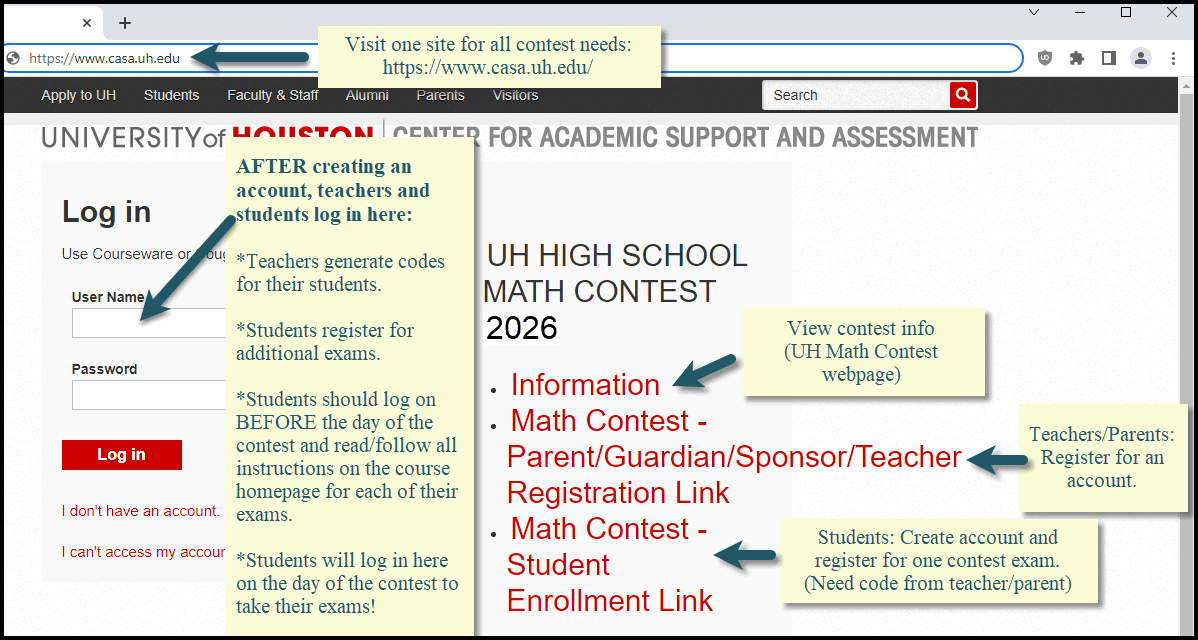
Accessing Your Course Subject Homepages and Contest Exams
After you have registered for your selected contest exams, you can access each course homepage by logging into your Courseware account at https://www.casa.uh.edu. Then click on the Courses tab and select the desired contest subject. A wealth of information about that contest exam can be found on that course homepage. Be sure to read all of it before the contest, and to do the same for your other contest exams.On the day of the contest, you will access your exams from each of these pages.
Any Questions? Contact Us!
Jeff Morgan: jjmorgan@uh.eduJennifer Marsala: jmarsala@central.uh.edu University of Houston Department of Mathematics
Contest Website: https://mathcontest.uh.edu